Recent Searches
Category

Microsoft Copilot Courses

Category

Microsoft Power BI

Category

AI for Business

Category

Microsoft Excel

Category

Professional Development

Category

Microsoft Office 365

Category

Excel Specialist

Category

Microsoft Project

Category

R Programming

Category

Python

Category

SQL

Category

Power Apps

Category

SharePoint

Category

Power Automate

Category

Microsoft Teams

Category

Microsoft Visio

Category

Microsoft PowerPoint

Category

Microsoft Word

Category

Microsoft Outlook

Category

WordPress

Category

Canva Courses

Category

Microsoft Access

Course

Copilot for M365

Course

Power BI Beginner

Course

ChatGPT Beginner

Course

Excel Beginner

Course

Achieving Leadership & Success

Course

Microsoft 365 Beginner

Course

Financial Modelling

Course

Project Beginner

Course

R Programming Beginner

Course

Python Basics

Course

SQL Beginner

Course

Power Apps Beginner

Course

SharePoint Beginner

Course

Teams Essentials

Course

Visio Essentials

Course

PowerPoint Level 1

Course

Word Beginner

Course

Microsoft Outlook Beginner to Intermediate

Course

WordPress Essentials

Course

Canva Beginners

Course

Microsoft Access Essentials

Course

Copilot for Word

Course

Power BI Intermediate

Course

Excel Intermediate

Course

Microsoft 365 Intermediate

Course

Analysis and Dashboards

Course

Project Intermediate

Course

R Programming Intermediate

Course

Python Intermediate

Course

SQL Intermediate

Course

Power Apps Intermediate

Course

SharePoint Intermediate

Course

PowerPoint Level 2

Course

Word Intermediate

Course

Canva Intermediate

Course

Microsoft Access Advanced

Course

Copilot for Excel

Course

Power BI Advanced

Course

Excel Advanced

Course

Microsoft 365 Advanced

Course

Excel VBA

Course

Project Advanced

Course

R Programming Advanced

Course

Python Advanced

Course

SQL Advanced

Course

Power Apps Advanced

Course

SharePoint Advanced (Site Owner)

Course

Word Advanced

Course

Canva Advanced

Course

Copilot for PowerPoint

Course

Power BI DAX

Course

Excel Expert

Course

Machine Learning in R

Course

SharePoint Advanced

Course

Copilot for Outlook and Teams

Course

Power Automate Beginner

Course

Power Automate Intermediate

Course

Microsoft Outlook Advanced

Course

AI Prompting Fundamentals

Course

Power Automate Advanced

Course

Excel Tables and Pivot Tables

Course

Data Transformation with Power Query

Course

Excel Macro Mastery

Course

Power BI Desktop Advanced Reporting

Course

AI for Business Leaders and Managers

Course

Data Visualisation with Power BI Desktop

Course

Anger Management & Negotiation Skills

Course

Assertiveness & Confidence

Course

Building Resilience

Course

Coaching and Mentoring

Course

Communications

Course

Communications & Quality Client Service Training

Course

Critical Thinking and Problem Solving

Course

Cultural Diversity in the Workplace

Course

Embracing Change

Course

Growing Emotional Intelligence

Course

Minute Taking

Course

Persuasion and Negotiation Skills

Course

Presentation Skills and Public Speaking

Course

Practical Project Management

Course

Respect, Equity and Diversity (RED)

Course

Resumé Writing and Interview Skills

Course

Stress Management

Course

Team Leadership, Management and Development

Course

Time Management Intensive

Course

Train the Trainer

Course

Write Effective Business Documents

Course

Dealing with Difficult People

Course

Managing Difficult Conversations

Course

Managing the Virtual Workplace

If Project Management forms part of your role, then lock in your MS Project Training. The skills we teach on our Microsoft Project Training courses will equip you and your team with the knowledge to develop project plans, assign resources to tasks, build Gantt charts, track progress, manage budgets and analyze workloads.
Managing projects can be complex. Our courses are offered at three levels to cater for all requirements and skill levels.

Find out more about each of our courses; Project Beginner, Intermediate and Advanced.

Project Training Courses

Course Icon Project Beginner

Learn the fundamentals of Microsoft Project. Create task lists, set milestones, assign resources, and understand scheduling concepts like the Critical Path Method.

download course pdf
Price: SG$415
Course Icon Project Intermediate

Build on your foundational skills by learning to assign resources, track progress, allocate costs, and work more efficiently using advanced Project views.

download course pdf
Price: SG$420
Course Icon Project Advanced

Automate and customise your project reporting with Macros and advanced tools. Learn to create custom graphical reports and optimise your workflows.

download course pdf
Price: SG$420

Upcoming Project Courses

Project Beginner

Project Intermediate

Project Advanced

Project Beginner
Date
Course
City
Status
Fri 15 May 26
Fri
15
May
Project Beginner
Remote SIN
Status: Scheduled
Scheduled
Wed 10 Jun 26
Wed
10
Jun
Project Beginner
Remote SIN
Status: Scheduled
Scheduled
Thu 9 Jul 26
Thu
9
Jul
Project Beginner
Remote SIN
Status: Scheduled
Scheduled
Wed 22 Jul 26
Wed
22
Jul
Project Beginner
Remote SIN
Status: Scheduled
Scheduled
Wed 26 Aug 26
Wed
26
Aug
Project Beginner
Remote SIN
Status: Scheduled
Scheduled
Thu 10 Sep 26
Thu
10
Sep
Project Beginner
Remote SIN
Status: Scheduled
Scheduled
Wed 23 Sep 26
Wed
23
Sep
Project Beginner
Remote SIN
Status: Scheduled
Scheduled
Project Intermediate
Date
Course
City
Status
Thu 14 May 26
Thu
14
May
Project Intermediate
Remote SIN
Status: Scheduled
Scheduled
Mon 25 May 26
Mon
25
May
Project Intermediate
Remote SIN
Status: Scheduled
Scheduled
Thu 11 Jun 26
Thu
11
Jun
Project Intermediate
Remote SIN
Status: Scheduled
Scheduled
Mon 29 Jun 26
Mon
29
Jun
Project Intermediate
Remote SIN
Status: Scheduled
Scheduled
Thu 16 Jul 26
Thu
16
Jul
Project Intermediate
Remote SIN
Status: Scheduled
Scheduled
Thu 20 Aug 26
Thu
20
Aug
Project Intermediate
Remote SIN
Status: Scheduled
Scheduled
Thu 17 Sep 26
Thu
17
Sep
Project Intermediate
Remote SIN
Status: Scheduled
Scheduled
Project Advanced
Date
Course
City
Status
Mon 18 May 26
Mon
18
May
Project Advanced
Remote SIN
Status: Scheduled
Scheduled
Tue 30 Jun 26
Tue
30
Jun
Project Advanced
Remote SIN
Status: Scheduled
Scheduled
Thu 30 Jul 26
Thu
30
Jul
Project Advanced
Remote SIN
Status: Scheduled
Scheduled
Fri 21 Aug 26
Fri
21
Aug
Project Advanced
Remote SIN
Status: Scheduled
Scheduled
Fri 11 Sep 26
Fri
11
Sep
Project Advanced
Remote SIN
Status: Scheduled
Scheduled
Scheduled
Taking enrollments.
Confirmed
Taking enrollments.
Few Seats left
Book Now.
Sold Out
Try another date.

Project Training Courses

Course Icon Project Beginner

Learn the fundamentals of Microsoft Project. Create task lists, set milestones, assign resources, and understand scheduling concepts like the Critical Path Method.

download course pdf
Price: SG$415
Course Icon Project Intermediate

Build on your foundational skills by learning to assign resources, track progress, allocate costs, and work more efficiently using advanced Project views.

download course pdf
Price: SG$420
Course Icon Project Advanced

Automate and customise your project reporting with Macros and advanced tools. Learn to create custom graphical reports and optimise your workflows.

download course pdf
Price: SG$420

Frequently Asked Questions

Who should attend Project Courses?

Our Microsoft Project training courses were designed for those who need to use Project in the workplace. From beginner to advanced, our trainers will work through exercises in a class environment with plenty of time for questions. Our Microsoft Project training is also ideal for those who want to upskill. 

What version of Microsoft Project is this course based on?

Our Microsoft Project courses are delivered using the most recent version of Microsoft Project desktop. We do not currently offer courses in Project Online.

What is Remote Training?

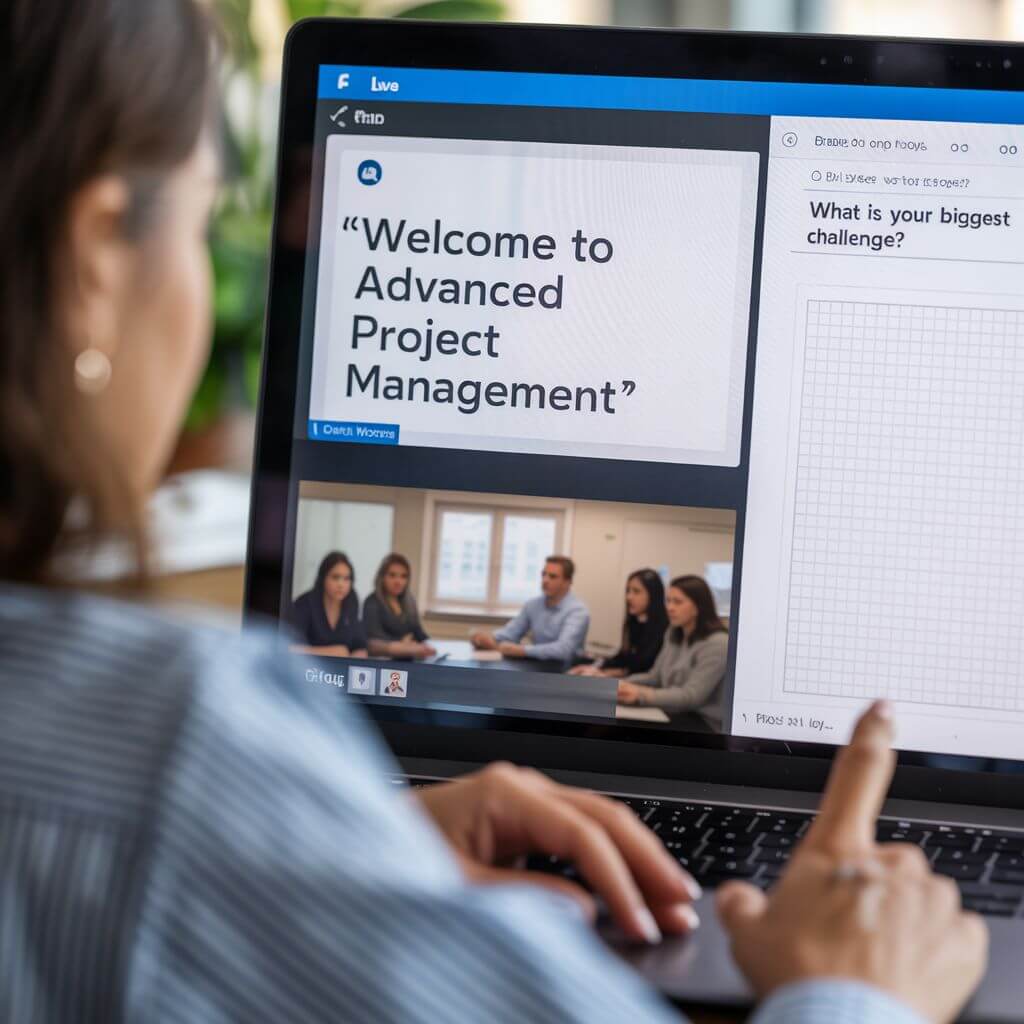
Remote Microsoft Project training at Nexacu means our team of experienced trainers will deliver your training virtually. With remote Microsoft project training, students can access our usual classroom training courses via video conferencing, ask questions, participate in discussions and share their screen with the trainer if they need help. Students have the same level of participation and access to the trainer as they would in classroom training sessions. 

What should I do to prepare for my online course?

Install the Microsoft Project desktop application. Note it is available on Windows only. Click here for detailed instructions. Ensure you have a valid license: Project Standard or Professional or Project Plan 3 or Plan 5. Plan 1 is not suitable for this course.

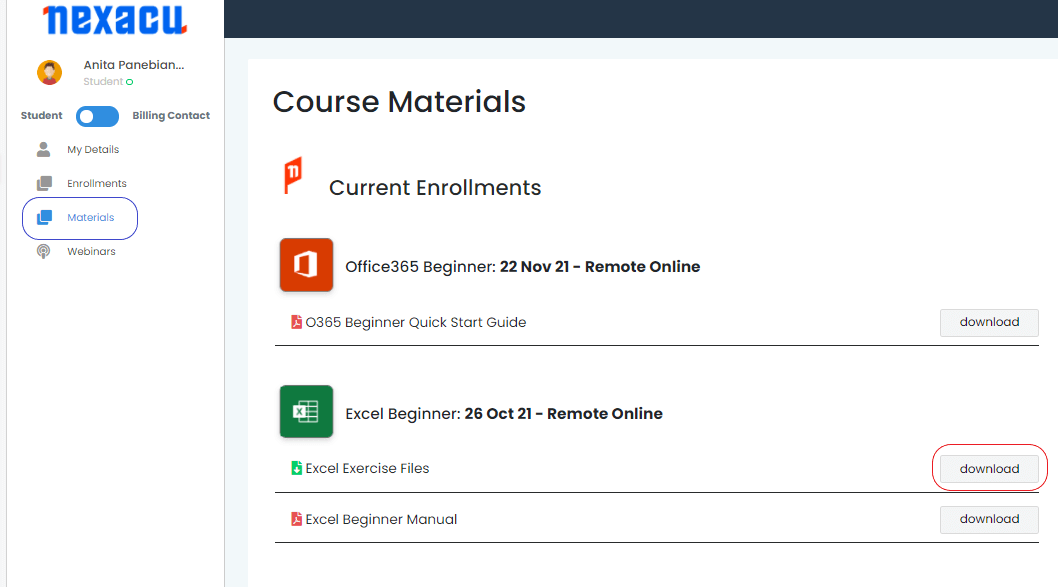
To download and unzip files, log in to your student portal and click on the "Materials" tab.

materials tab Nexacu Hub

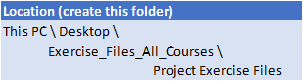
Download your exercise files and extract them to the folder specified below. You will need to create this folder prior to extracting your files. 


exercise files

Course Details

Download Course PDF
Price
SG$415
Duration
1 day
Times
9am - 4pm ( approx )
Class Size (max)
10
Class Size (avg)
5
Reference Materials
Provided
CPD Hours
6 hours
Delivery
Instructor-led training
Live Online

Course Details

Download Course PDF
Price
SG$420
Duration
1 day
Times
9am - 4pm ( approx )
Class Size (max)
10
Class Size (avg)
5
Reference Materials
Provided
CPD Hours
6 hours
Delivery
Instructor-led training
Live Online

Course Details

Download Course PDF
Price
SG$420
Duration
1 day
Times
9am - 4pm ( approx )
Class Size (max)
10
Class Size (avg)
5
Reference Materials
Provided
CPD Hours
6 hours
Delivery
Instructor-led training
Live Online

skills test nexacu

Skills Test

Try our short skills test and find out which course is right for you.

 skills test


Locations In-Person & Online

Find the nearest location and date that works for you

Locations In-Person & Online

Find the nearest location and date that works for you

Trusted Globally by Leading Organisations

At Nexacu, we are proud to be the trusted training partner for hundreds of leading organisations across Australia, New Zealand, and around the world. From government agencies to multinational corporations, we help teams build practical skills and achieve real outcomes through expert-led training.

  • 400+ companies rely on Nexacu for workforce development
  • Trusted by government agencies at all levels
  • Delivering training across 9 countries and growing

Why Nexacu? 

step by step courseware

Step by Step Courseware

Custom workbook included with a step by step exercises

Facility Image 2
Facility Image 3
Facility Image 1

Interactive real time training

Interactive, Real-Time Training

Learn with expert instructors, wherever you are

Trusted by Business

Trusted by Business

Procured by Government

Procured by Goverment

Reviews Not Found

Valued by Individuals