Select your country to view prices and course dates.

x

Recent Searches
Category

Microsoft Copilot Courses

Category

Microsoft Power BI

Category

AI for Business

Category

Microsoft Excel

Category

Professional Development

Category

Microsoft Office 365

Category

Excel Specialist

Category

Microsoft Project

Category

R Programming

Category

Python

Category

SQL

Category

Power Apps

Category

SharePoint

Category

Power Automate

Category

Microsoft Teams

Category

Microsoft Visio

Category

Microsoft PowerPoint

Category

Microsoft Word

Category

Microsoft Outlook

Category

Adobe InDesign Courses

Category

Adobe Photoshop Courses

Category

Adobe Illustrator Courses

Category

Adobe Premiere Pro Training

Category

Adobe After Effects Training

Category

Adobe Acrobat Courses

Category

Adobe Captivate Training

Category

Adobe Animate Training

Category

HTML Courses

Category

WordPress

Category

Canva Courses

Category

Microsoft Access

Category

Webinars

Course

Copilot for M365

Course

Power BI Beginner

Course

ChatGPT Beginner

Course

Excel Beginner

Course

Achieving Leadership & Success

Course

Microsoft 365 Beginner

Course

Financial Modelling

Course

Project Beginner

Course

R Programming Beginner

Course

Python Beginner

Course

SQL Beginner

Course

Power Apps Beginner

Course

SharePoint Beginner

Course

Teams Essentials

Course

Visio Essentials

Course

PowerPoint Level 1

Course

Word Beginner

Course

Microsoft Outlook Beginner

Course

InDesign Lite

Course

Photoshop Training Intro

Course

Illustrator Training Intro

Course

Premiere Training Intro

Course

After Effects Training Intro

Course

Acrobat Essentials

Course

Captivate Training

Course

Animate Training Intro

Course

HTML Training Intro

Course

WordPress Essentials

Course

Canva Beginners

Course

Microsoft Access Essentials

Course

Copilot for Word

Course

Power BI Intermediate

Course

Excel Intermediate

Course

Microsoft 365 Intermediate

Course

Analysis and Dashboards

Course

Project Intermediate

Course

R Programming Intermediate

Course

Python Intermediate

Course

SQL Intermediate

Course

Power Apps Intermediate

Course

SharePoint Intermediate

Course

PowerPoint Level 2

Course

Word Intermediate

Course

InDesign Training Intro

Course

Photoshop Lite

Course

Illustrator Training Advanced

Course

Premiere Basics Training

Course

Acrobat Forms

Course

Canva Intermediate

Course

Microsoft Access Advanced

Course

Copilot for Excel

Course

Power BI Advanced

Course

Excel Advanced

Course

Microsoft 365 Advanced

Course

Excel VBA

Course

Project Advanced

Course

R Programming Advanced

Course

Python Advanced

Course

SQL Advanced

Course

Power Apps Advanced

Course

SharePoint Advanced (Site Owner)

Course

Word Advanced

Course

InDesign Training Advanced

Course

Photoshop Training Advanced

Course

Advanced Premiere Training

Course

Advanced After Effects Training

Course

Canva Advanced

Course

Copilot for PowerPoint

Course

Power BI DAX

Course

Excel Expert

Course

Machine Learning in R

Course

SharePoint Advanced (Document Governance)

Course

InDesign Interactivity Training

Course

Copilot for Outlook and Teams

Course

InDesign Accessibility Training

Course

Power Automate Beginner

Course

Power Automate Intermediate

Course

Microsoft Outlook Advanced

Course

AI Prompting Fundamentals

Course

Power Automate Advanced

Course

Excel Tables and Pivot Tables

Course

Data Transformation with Power Query

Course

Excel Macro Mastery

Course

Power BI Desktop Advanced Reporting

Course

AI for Business Leaders and Managers

Course

Data Visualisation with Power BI Desktop

Course

Anger Management & Negotiation Skills

Course

Assertiveness & Confidence

Course

Building Resilience

Course

Coaching and Mentoring

Course

Communications

Course

Communications & Quality Client Service Training

Course

Critical Thinking and Problem Solving

Course

Cultural Diversity in the Workplace

Course

Embracing Change

Course

Growing Emotional Intelligence

Course

Minute Taking

Course

Persuasion and Negotiation Skills

Course

Presentation Skills and Public Speaking

Course

Practical Project Management

Course

Respect, Equity and Diversity (RED)

Course

Resumé Writing and Interview Skills

Course

Stress Management

Course

Team Leadership, Management and Development

Course

Time Management Intensive

Course

Train the Trainer

Course

Write Effective Business Documents

Course

Dealing with Difficult People

Course

Managing Difficult Conversations

Course

Managing the Virtual Workplace

All courses are available in-person or remotely.
To attend remotely, select "Remote Online" as your location on book now.

Learn about the advanced capabilities of Power Apps when combined with the Common Data Service (CDS) in this low-code course. You will deliver a case study solution leveraging the CDS to securely store and manage data that's used by your business applications. You will set up entities, logic and validation in CDS and explore building Model-Driven Apps and Portals.

By the end of this course, you will be able to:

  • Understand the full capabilities of Power Apps
  • Create and modify Microsoft Dataverse (formerly CDS) to store data
  • Connect canvas and model-driven apps to Dataverse
  • Build Portal apps for external users to view data

Prerequisite:

Participants should have completed Power Apps Beginner and Intermediate courses. A Power Apps Premium licence is required, and the course is designed for skilled end-users.

Upcoming Courses

Scheduled
Taking enrollments.
Confirmed
Taking enrollments.
Few Seats left
Book Now.
Sold Out
Try another date.

Power Apps Training Courses

Course Icon Power Apps Beginner

This beginner Power Apps training course teaches you how to build custom business apps using Microsoft’s low-code platform.

download course pdf
Course Icon Power Apps Intermediate (Building Smarter, Scalable Apps)

In this intermediate Power Apps training course, you’ll work with canvas components, collections, and Power Automate integrations.

download course pdf
PL-100 Power Apps Certification

Become a Microsoft Power Apps certified expert. Attend Nexacu Power Apps & Power BI courses, sit the PL-100 exam and become a Microsoft Certified Power Platform App Maker Associate.

Price: 

A$ 2,015
inc GST

PowerApps Advanced Course Content

Expand All | Collapse All

Introduction to Power Platform

What is the Power Platform

Components of the Power Platform

The Common Data Service (CDS) and the Power Platform

Licencing requirements

Understanding different licencing

Understanding per app licencing

Understanding per user licencing

Understanding portal subscriptions

Case study introduction

The business problem

Planning a Power Platform solution

Common data service

What is the Common Data Service

What is the Common data model

Understanding elements of the Common Data Service

Creating a solution

What is a solution

When to use solutions

Create a solution in Common Data Service

Creating a publisher

What is a publisher

When to use publishers

Create a publisher in Common Data Service

Entities

What is an entity

Exploring standard entities

Creating an entity

Exploring custom entities

Fields

What is a field

What is a primary field

Exploring standard fields in an entity

Creating date fields

Creating option set fields

Fields (cont'd)

Creating a new Option set

Creating currency fields

Creating text fields

Creating calculated fields

Creating image fields

Saving your entity

Understand when to save your entity

Adding data to an Entity

How to add data via Excel

Add data within Power Apps

Add images to records

Using views

Understanding what views are

Using views to see data

Editing existing views

Creating new views

Using forms

Understanding what forms are

Using forms to see records

Editing existing forms

Creating new forms

Entity relationships

Exploring standard relationships

Understanding different types of relationships

Creating a relationship between entities

Business Rules

What are business rules

When to use business rules

Creating a business rule

Setting a field value

Hiding a field

Validating, saving and activating business rules

Adding data to an entity

Different ways of adding data

Adding data using Excel

Adding data through a form

Editing forms

Canvas Apps

Uploading a pre-built canvas app

Displaying the app version in the app

Connecting Canvas app to entity

Connecting to Common Data Service entities

Connecting CDS data source to a gallery

Setting up the Canvas App

Adding a form

Editing fields

Using a gallery to select records

Understanding look up fields in canvas apps

Entering data via the Canvas App

Searching entity data

Using a barcode to find data

Sharing canvas apps

Model-driven app

What is a model-driven app

Purpose of using a model-driven app

Relationship between app and data types

Creating Model-driven app

Creating a model-driven app

Understanding a site map

Editing a site map

Using the App designer

Creating a new view in the app designer

Creating Model-driven app (cont'd)

Using related fields in views

Playing the app

Editing a form in the app designer

Publishing all customisations

Sharing model-driven apps

Changing data with the model-driven app

Business process flows

Understanding business process flows

Creating a new business process flows

Adding stages

Adding data steps

Adding conditions

Connecting steps

Portal App

Understanding Common Data Service connectors in Power Automate

Creating a flow in a solution

Understanding CDS triggers

Using CDS actions to retrieve data

Portal Apps

What is a Portal app

Purpose of using a portal app

Creating a portal app

Administering Portal Apps

Understanding different options of administering a portal

Exploring the portal admin centre

Understanding the model-driven management app

Exploring the portal management app

Exploring the portal designer

Content management of a Portal App

Updating website content with click and type

Updating website content with code

Updating website content through model-driven app

Adding pages to a portal site

Connecting CDS to Portal App

Connecting CDS to the portal

Displaying data in a portal

Security of a Portal App

Understanding portal security and permissions

Creating web page access control rules

Applying permissions to a page

How to authenticate a user

Viewing a restricted page

Frequently Asked Questions

What is Power Apps?

Power Apps is a Microsoft application which allows anybody to create an App using a point and click approach. It empowers business users to create apps to solve problems and improve processes in the workplace without the need for IT developers to create the solutions.

How are Power Apps used in the workplace?

Power Apps is the platform and how it is used is as varied as Microsoft's customer base. A common use of Power Apps is as a data collection tool. Workers in the field collect data via the app on their device which is then collated in the cloud. The combined data can be consumed using Power BI to drive actions.

How long does it take to learn Power Apps?

After our one-day Power Apps beginner course you will be able to create a professional app which you can share within your organization. You can continue on the our intermediate course to advance your knowledge and capability within PowerApps. Learning how to integrate Power Apps with Power Automate and Power BI will open up lots more possibilities.

What is Remote Training?

Remote training at Nexacu, means our team of experienced trainers will deliver your training virtually. With remote learning students can access our usual classroom training courses via video conferencing, ask questions, participate in discussion and share their screen with the trainer if they need help at any point in the course. Students have the same level of participation and access to the trainer as they would in classroom training sessions.

Which courses are available remotely?

Currently all of our Public Courses are delivered remotely. Book any course and you will receive login details and instructions the evening before your session.

How should I prepare for my online course?

Install the Microsoft Teams desktop application. This can be done from Microsoft's website.

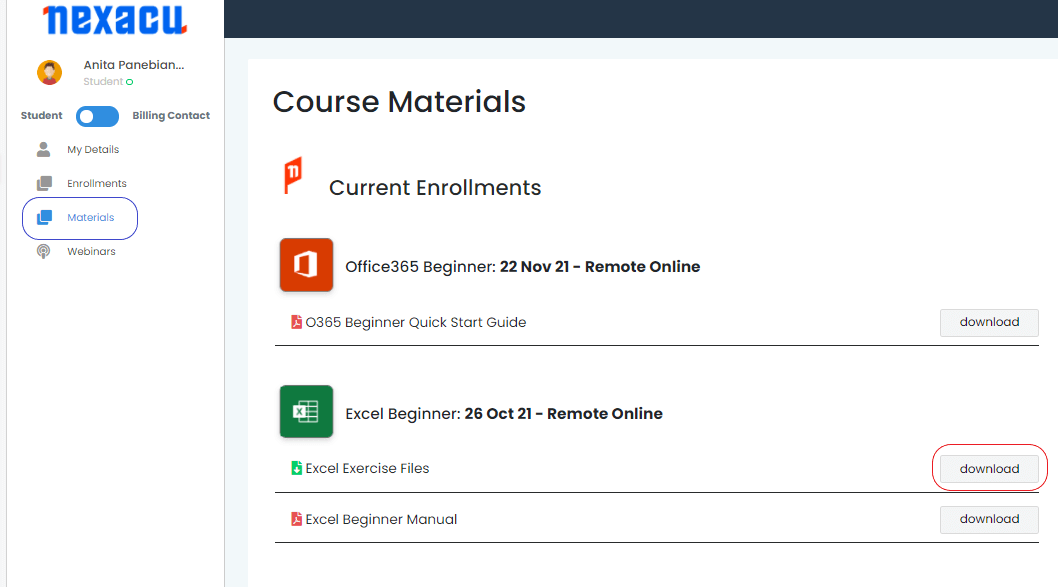
Download and unzip files by logging into your student portal. Click on the "Materials" tab and download your exercise files. 

materials tab Nexacu Hub

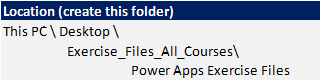
Extract your Exercise Files to the specified folder below. You will need to create this folder first. 

files

skills test nexacu

Skills Test

Try our short skills test and find out which course is right for you.

 skills test


Locations In-Person & Online

Find the nearest location and date that works for you

Locations In-Person & Online

Find the nearest location and date that works for you

Related Training Courses

Course Icon Power Apps Beginner

This beginner Power Apps training course teaches you how to build custom business apps using Microsoft’s low-code platform.

download course pdf
Course Icon Power Apps Intermediate (Building Smarter, Scalable Apps)

In this intermediate Power Apps training course, you’ll work with canvas components, collections, and Power Automate integrations.

download course pdf
PL-100 Power Apps Certification

Become a Microsoft Power Apps certified expert. Attend Nexacu Power Apps & Power BI courses, sit the PL-100 exam and become a Microsoft Certified Power Platform App Maker Associate.

Price: 

A$ 2,015
inc GST

Locations In-Person & Online

Find the nearest location and date that works for you

Locations In-Person & Online

Find the nearest location and date that works for you

Trusted Globally by Leading Organisations

At Nexacu, we are proud to be the trusted training partner for hundreds of leading organisations across Australia, New Zealand, and around the world. From government agencies to multinational corporations, we help teams build practical skills and achieve real outcomes through expert-led training.

  • 400+ companies rely on Nexacu for workforce development
  • Trusted by government agencies at all levels
  • Delivering training across 9 countries and growing

Why Nexacu? 

step by step courseware

Step by Step Courseware

Custom workbook included with a step by step exercises

Facility Image 2
Facility Image 3
Facility Image 1

Interactive real time training

Interactive, Real-Time Training

Learn with expert instructors, wherever you are

Trusted by Business

Trusted by Business

Procured by Government

Procured by Goverment

Reviews Not Found

Valued by Individuals