Select your country to view prices and course dates.

x

Recent Searches
Category

Microsoft Copilot Courses

Category

Microsoft Power BI

Category

AI for Business

Category

Microsoft Excel

Category

Professional Development

Category

Microsoft Office 365

Category

Excel Specialist

Category

Microsoft Project

Category

R Programming

Category

Python

Category

SQL

Category

Power Apps

Category

SharePoint

Category

Power Automate

Category

Microsoft Teams

Category

Microsoft Visio

Category

Microsoft PowerPoint

Category

Microsoft Word

Category

Microsoft Outlook

Category

Adobe InDesign Courses

Category

Adobe Photoshop Courses

Category

Adobe Illustrator Courses

Category

Adobe Premiere Pro Training

Category

Adobe After Effects Training

Category

Adobe Acrobat Courses

Category

Adobe Captivate Training

Category

Adobe Animate Training

Category

HTML Courses

Category

WordPress

Category

Canva Courses

Category

Microsoft Access

Category

Webinars

Course

Copilot for M365

Course

Power BI Beginner

Course

ChatGPT Beginner

Course

Excel Beginner

Course

Achieving Leadership & Success

Course

Microsoft 365 Beginner

Course

Financial Modelling

Course

Project Beginner

Course

R Programming Beginner

Course

Python Beginner

Course

SQL Beginner

Course

Power Apps Beginner

Course

SharePoint Beginner

Course

Teams Essentials

Course

Visio Essentials

Course

PowerPoint Level 1

Course

Word Beginner

Course

Microsoft Outlook Beginner

Course

InDesign Lite

Course

Photoshop Training Intro

Course

Illustrator Training Intro

Course

Premiere Training Intro

Course

After Effects Training Intro

Course

Acrobat Essentials

Course

Captivate Training

Course

Animate Training Intro

Course

HTML Training Intro

Course

WordPress Essentials

Course

Canva Beginners

Course

Microsoft Access Essentials

Course

Copilot for Word

Course

Power BI Intermediate

Course

Excel Intermediate

Course

Microsoft 365 Intermediate

Course

Analysis and Dashboards

Course

Project Intermediate

Course

R Programming Intermediate

Course

Python Intermediate

Course

SQL Intermediate

Course

Power Apps Intermediate

Course

SharePoint Intermediate

Course

PowerPoint Level 2

Course

Word Intermediate

Course

InDesign Training Intro

Course

Photoshop Lite

Course

Illustrator Training Advanced

Course

Premiere Basics Training

Course

Acrobat Forms

Course

Canva Intermediate

Course

Microsoft Access Advanced

Course

Copilot for Excel

Course

Power BI Advanced

Course

Excel Advanced

Course

Microsoft 365 Advanced

Course

Excel VBA

Course

Project Advanced

Course

R Programming Advanced

Course

Python Advanced

Course

SQL Advanced

Course

Power Apps Advanced

Course

SharePoint Advanced (Site Owner)

Course

Word Advanced

Course

InDesign Training Advanced

Course

Photoshop Training Advanced

Course

Advanced Premiere Training

Course

Advanced After Effects Training

Course

Canva Advanced

Course

Copilot for PowerPoint

Course

Power BI DAX

Course

Excel Expert

Course

Machine Learning in R

Course

SharePoint Advanced (Document Governance)

Course

InDesign Interactivity Training

Course

Copilot for Outlook and Teams

Course

InDesign Accessibility Training

Course

Power Automate Beginner

Course

Power Automate Intermediate

Course

Microsoft Outlook Advanced

Course

AI Prompting Fundamentals

Course

Power Automate Advanced

Course

Excel Tables and Pivot Tables

Course

Data Transformation with Power Query

Course

Excel Macro Mastery

Course

Power BI Desktop Advanced Reporting

Course

AI for Business Leaders and Managers

Course

Data Visualisation with Power BI Desktop

Course

Anger Management & Negotiation Skills

Course

Assertiveness & Confidence

Course

Building Resilience

Course

Coaching and Mentoring

Course

Communications

Course

Communications & Quality Client Service Training

Course

Critical Thinking and Problem Solving

Course

Cultural Diversity in the Workplace

Course

Embracing Change

Course

Growing Emotional Intelligence

Course

Minute Taking

Course

Persuasion and Negotiation Skills

Course

Presentation Skills and Public Speaking

Course

Practical Project Management

Course

Respect, Equity and Diversity (RED)

Course

Resumé Writing and Interview Skills

Course

Stress Management

Course

Team Leadership, Management and Development

Course

Time Management Intensive

Course

Train the Trainer

Course

Write Effective Business Documents

Course

Dealing with Difficult People

Course

Managing Difficult Conversations

Course

Managing the Virtual Workplace

Learning Excel skills can improve your productivity in a multitude of ways. Our Excel training online courses have been designed to equip you with practical skills such as: 

  • Better data analysis: using powerful data analysis tools through our basic Excel course online such as pivot tables, Excel functions, and charts, that allow you to quickly summarize and visualize large data sets.
  • Enhanced decision-making: so you can use data to make informed decisions by creating scenarios, performing what-if analysis, and creating forecasts through our advanced online Excel courses.
  • Improved organisation: that can help you stay organized by allowing you to easily sort, filter, and group data.
  • Better collaboration: helping you collaborate more effectively with colleagues, customers, and vendors. Everyone excels with the right skill set brought to the workplace. 
  • Increased career opportunities: as Excel is considered a highly valuable skill in many industries, and learning it can open up new career opportunities and enhance your resume.
  • Cost savings: helping you manage budgets, inventory, and other financial information, you can save time and money compared to using manual processes.
  • Flexibility: equipping you with a wide range of knowledge, from basic calculations to complex data analysis and modelling.

If you're unsure about which level to sign up for, try our free skills test for an instant recommendation, or simply view the course outlines. You don't have to search for "excel training course near me" as these courses are purely online for your convenience. 


Excel Training Courses

Course Icon Excel Beginner

Learn how to manage, analyse and share everyday data using Excel spreadsheets. Perfect for new users or those looking to build a solid foundation.

download course pdf
Course Icon Excel Intermediate

Take your Excel skills to the next level with complex formulas, conditional formatting, PivotTables, data validation and more.

download course pdf
Course Icon Excel Advanced

Master advanced Excel tools including dynamic arrays, named ranges, structured references and high-level data analysis techniques.

download course pdf
Course Icon Excel Expert

Become a power user with advanced data wrangling, automation and integration using Excel and the Power Platform.

download course pdf
Course Icon Excel Tables and Pivot Tables

Learn to build powerful reports with PivotTables, data consolidation and visualisation techniques in just one day.

download course pdf
Course Icon Excel Macro Mastery

Automate your workflow with Excel macros. Learn to record, edit and run simple macros to boost efficiency and save time.

download course pdf
MO-201 Excel Certification

Become a Microsoft Excel certified. Attend our Nexacu Excel courses remotely, choose to sit the Excel Specialist or Excel Expert exam and get Microsoft Certified.

Price: 

A$1,430
inc GST

Upcoming Excel Courses

Excel Beginner

Excel Intermediate

Excel Advanced

Excel Beginner

We are busy updating this schedule. 


Excel Intermediate

We are busy updating this schedule. 


Excel Advanced

We are busy updating this schedule. 


Scheduled
Taking enrollments.
Confirmed
Taking enrollments.
Few Seats left
Book Now.
Sold Out
Try another date.

Excel Training Courses

Course Icon Excel Beginner

Learn how to manage, analyse and share everyday data using Excel spreadsheets. Perfect for new users or those looking to build a solid foundation.

download course pdf
Course Icon Excel Intermediate

Take your Excel skills to the next level with complex formulas, conditional formatting, PivotTables, data validation and more.

download course pdf
Course Icon Excel Advanced

Master advanced Excel tools including dynamic arrays, named ranges, structured references and high-level data analysis techniques.

download course pdf
Course Icon Excel Expert

Become a power user with advanced data wrangling, automation and integration using Excel and the Power Platform.

download course pdf
Course Icon Excel Tables and Pivot Tables

Learn to build powerful reports with PivotTables, data consolidation and visualisation techniques in just one day.

download course pdf
Course Icon Excel Macro Mastery

Automate your workflow with Excel macros. Learn to record, edit and run simple macros to boost efficiency and save time.

download course pdf
MO-201 Excel Certification

Become a Microsoft Excel certified. Attend our Nexacu Excel courses remotely, choose to sit the Excel Specialist or Excel Expert exam and get Microsoft Certified.

Price: 

A$1,430
inc GST

Frequently Asked Questions

Will the content in these Excel courses be relevant for the workplace?

Absolutely! Our expertise lies in delivering hands-on training exercises that are applicable to all kinds of workplaces. We cover essential elements such as formula introduction, pivot tables, charting, and more. Moreover, we are happy to discuss and incorporate specific examples tailored to your workplace tasks, ensuring that you receive relevant and practical training. Reach out to us to learn more about our training programs.

How many students are typically in an Excel training course?

While this varies from session to session, we typically have 5-8 students in an Excel class. We cap our classes at 10 students to ensure the quality of training remains of the highest standard, and so all students can ask questions and engage in discussion.

What should I do to prepare for my online course?

You'll need to install the latest version of Excel and ensure you have the appropriate license to use it. 

Our Excel Advanced course requires Excel 2016 or later. Windows standalone versions of Microsoft 365 subscription plans are also required.

Microsoft 365 subscription plans are required for the Excel Expert course. You will also need to download and install Power Automate Desktop.

The browser you use is very important. It is recommended you use Chrome, Edge, or Firefox. The latest version must also be installed. Note that Internet Explorer is not compatible with our delivery technologies. 

Windows 10 is highly recommended as the operating system you use. If you are using an apple device, use Safari or a similar modern browser if you cannot use any of the browsers recommended above. Your training experience may diminish due to different features and appearances. Nexacu's trainers are unable to provide detailed guidance for macOS.

To download and unzip files, log in to your student portal. Click on the "Materials" tab and download your exercise files. 
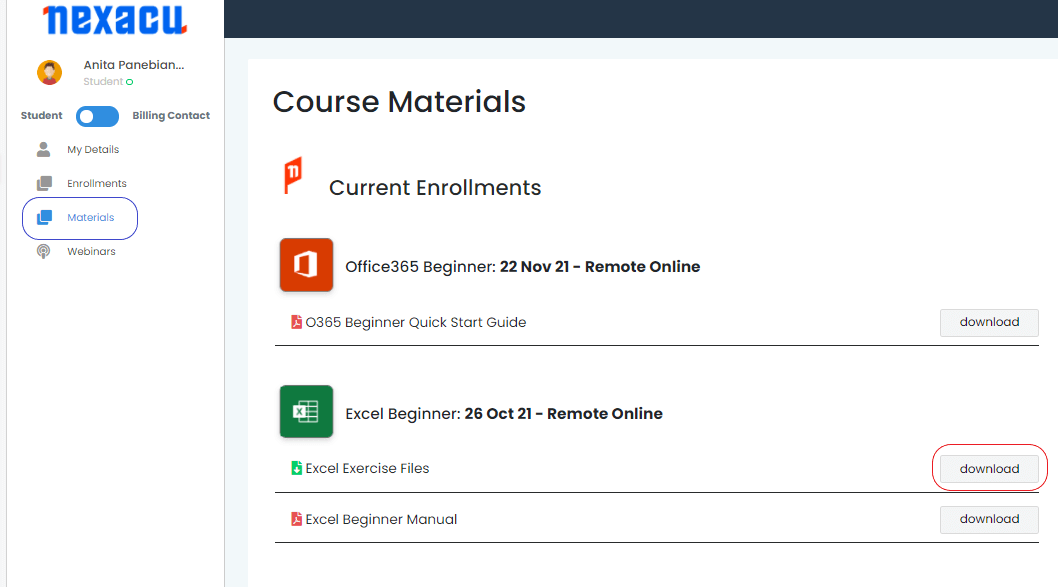
materials tab Nexacu Hub

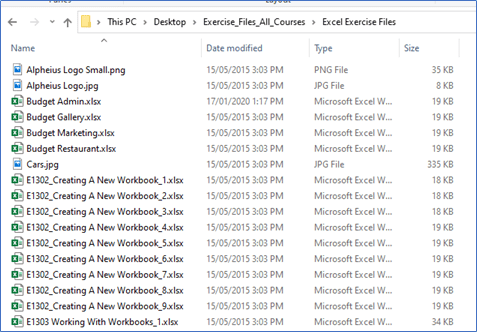
Extract your Exercise Files to the specified folder below:
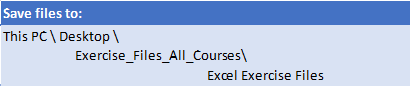
exercise files

To save files to the folder specified above create a folder called Exercise_Files_All_Courses on your computer (in This PC). Create another folder under this called Excel Exercise Files. All files should be unzipped or copied to this folder.
save location

Course Details

Download Course PDF
Duration
1 day
Times
9am - 4pm ( approx )
Class Size (max)
10
Class Size (avg)
5
Reference Materials
Provided
CPD Hours
6 hours
Delivery
Instructor-led training
Live Online

Course Details

Download Course PDF
Duration
1 day
Times
9am - 4pm ( approx )
Class Size (max)
10
Class Size (avg)
5
Reference Materials
Provided
CPD Hours
6 hours
Delivery
Instructor-led training
Live Online

Course Details

Download Course PDF
Duration
1 day
Times
9am - 4pm ( approx )
Class Size (max)
10
Class Size (avg)
5
Reference Materials
Provided
CPD Hours
6 hours
Delivery
Instructor-led training
Live Online

Course Details

Download Course PDF
Duration
1 day
Times
9am - 4pm ( approx )
Class Size (max)
10
Class Size (avg)
5
Reference Materials
Provided
CPD Hours
6 hours
Delivery
Instructor-led training
Live Online

Course Details

Download Course PDF
Duration
1 day
Times
9am - 4pm ( approx )
Class Size (max)
8
Class Size (avg)
6
Reference Materials
Provided
CPD Hours
6 hours
Delivery
Instructor-led training
Live Online

Course Details

Download Course PDF
Duration
3 hours
Times
9am - 4pm ( approx )
Class Size (max)
8
Class Size (avg)
6
Reference Materials
Provided
CPD Hours
3 hours
Delivery
Instructor-led training
Live Online

skills test nexacu

Skills Test

Try our short skills test and find out which course is right for you.

 skills test


Locations In-Person & Online

Find the nearest location and date that works for you

Locations In-Person & Online

Find the nearest location and date that works for you

Trusted Globally by Leading Organisations

At Nexacu, we are proud to be the trusted training partner for hundreds of leading organisations across Australia, New Zealand, and around the world. From government agencies to multinational corporations, we help teams build practical skills and achieve real outcomes through expert-led training.

  • 400+ companies rely on Nexacu for workforce development
  • Trusted by government agencies at all levels
  • Delivering training across 9 countries and growing

Why Nexacu? 

step by step courseware

Step by Step Courseware

Custom workbook included with a step by step exercises

Facility Image 2
Facility Image 3
Facility Image 1

Interactive real time training

Interactive, Real-Time Training

Learn with expert instructors, wherever you are

Trusted by Business

Trusted by Business

Procured by Government

Procured by Goverment

Reviews Not Found

Valued by Individuals