Australia
 New Zealand
 Singapore
 Hong Kong
 Malaysia
 Philippines
 Thailand
 Indonesia

Did you know that just by dabbling in AI, your business’s end users can save 11 minutes a day? This translates to 10 hours saved, or one whole work week each year.
Microsoft recently surveyed 1,300 Copilot for Microsoft 365 users across different functions and industries. These users shared feedback on AI’s impact on productivity, work enjoyment, challenges and more. From there, they found a significant tipping point at play, which they dubbed the “11-by-11 phenomenon.”
Their findings show that just 11 minutes of time savings can make AI feel invaluable. And after 11 weeks, its impact on work becomes genuinely transformative. Also, most people save more time each day. More efficient users saved 30 minutes daily (10 hours a month), while average users saved 14 minutes daily (five hours a month).
The benefits of AI tools for productivity and more
Based on the survey of Copilot users, AI has improved four critical areas at work: productivity, work enjoyment, work-life balance, and meetings.
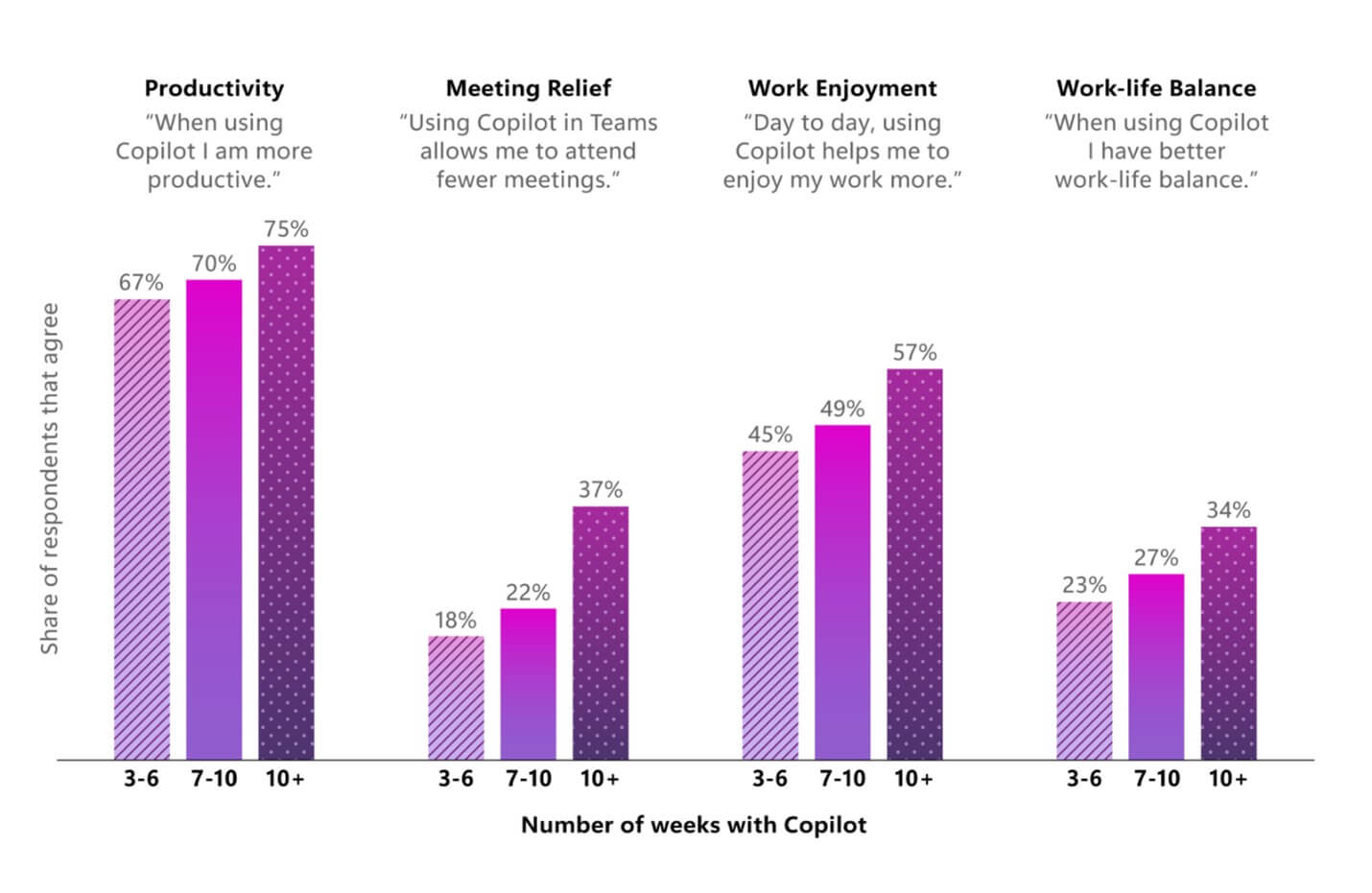
When it came to meetings, respondents said they could attend fewer meetings. This could be due to Copilot's ability to improve communication and reduce back-and-forth emails and discussions. For example, staff who missed meetings can leverage AI transcriptions and notes to understand what the team discussed and what next steps they need to take. You can also use AI to summarize long documents and complicated email threads.
How to use AI for work productivity
Thanks to AI, there has been a big shift in how we approach tasks and manage our time. We share a few scenarios on how you can maximize AI for productivity using Copilot for Microsoft 365 applications.
Images for Brainstorming
James Thomas is the Global Head of Technology at Dentsu Creative, a digital advertising network. He suggests leveraging AI during brainstorming sessions and meetings to streamline the creation of preliminary visuals, allowing for quicker ideation and decision-making processes.
“Being able to visualize a lot of these ideas really helps you know if you’re going down the wrong route or the right one. It really gets us where we need to go a lot faster.”
Microsoft's AI image generator helps you describe and transform your ideas from text to images. This paints a better picture of what you envision, bringing you and the rest of the team on the same page regarding the output.
Post-Meeting Documentation
Copilot integrates with Microsoft Teams, offering features like automatic meeting note summaries, action item tracking, highlights, and key points creation. This ensures that crucial information is not missed while reducing the time spent on post-meeting notes, minutes, and action points.
Email Communication
Streamlining communication is made effortless with Copilot's assistance in drafting emails. From grammar and clarity suggestions to improving tone and readability, Copilot ensures that your messages are concise, professional, and compelling.
Data Analysis
Get Copilot assistance in Excel. This way, you can get suggestions for formulae for each column. You can also generate charts and summarize data. Copilot can also highlight interesting portions of the data so you can surface insights better.
Business Chat and Collaboration
Copilot eases collaboration by helping draft shared documents, brainstorming ideas, and creating real-time content, fostering seamless teamwork, and enhancing productivity.
Content Creation
Do you often draft reports, essays, and presentations? Copilot elevates content creation. You can find the Editor feature in Microsoft Word next to Dictate and Designer. This feature can suggest improvements to provide more context and synonyms and can help rewrite complete sentences vs. making corrections one at a time.
Based on Microsoft evaluations, the Editor is 15% more effective than previous approaches in spotting mistakes.
Employee Engagement
What are the best times for team training? Which staff should you book that next coffee date with? Copilot and Viva Engage can easily answer these kinds of questions. This combination can be invaluable for those involved in People & Performance, organisational leadership, or internal communication.
By gathering data on team schedules, locations, stated profiles and interests - these tools help with drafting impactful communications. You can start conversations, make announcements at scale, and create virtual town halls.
Expand your Microsoft Copilot knowledge and skills with Nexacu
The 11-by-11 tipping point signifies a transformative moment in adopting AI at work. With Microsoft Copilot training, organisations can boost productivity, efficiency and collaboration.
If you want to learn more about what Microsoft Copilot can do for your business, why not enrol in a Nexacu course? We offer the following programs:
- Copilot for Microsoft 365 - Introduction Course: This course will help you use Microsoft Copilot to automate tasks, generate content, and gain insights to improve efficiency in Word, Excel, PowerPoint, Teams, and Outlook.
Our trainers use real-world examples to help you gain practical skills and learn the possibilities when using Microsoft Copilot technology. Better yet, you’ll have access to a fully functional version of Copilot during training and for 30 days after. So you know you’ll get the hands-on experience you need to confidently, and immediately, apply AI to your work. Ready to see what Microsoft Copilot can do for your business? Inquire with us on a course today.